Household budget book on paper or digital: which method fits?
Paper, Excel spreadsheet or app? What each household budget method costs in Germany, how much work it takes and how to start for free.
In this article8
- Paper, spreadsheet or app: which household budget book is best?
- How do you keep a household budget book as a beginner?
- Budgeting apps: what the Finanztest comparison shows
- Is the Finanzguru app really free?
- Create a household budget book in Excel or on paper for free
- How can a household budget book help you save money?
- Frequently asked questions
- Sources

Paper, spreadsheet or app: which household budget book is best?
The best household budget book (Haushaltsbuch) is the one you actually keep every week. Digital or on paper, every method answers the same questions: how much you spend, on what and where you can save.[1] They differ in who does the work and who sees your account data.
For apps, there is a clear finding. Finanztest is the finance magazine of the German consumer testing organisation Stiftung Warentest. It considers budget books more convenient as an app than on paper, and apps with an account link scored better in its test than apps without.[2] An account link means you allow the app to look at your account.[3] Every transaction is then picked up and categorised automatically.[2]
| Method | Cost to start | Effort in daily life | Account access by a third party | Suits |
|---|---|---|---|---|
| Paper | free with printable templates | collect receipts, enter them once a week | no | people paying cash, anyone who wants to plan without a screen |
| Spreadsheet (Excel, LibreOffice, Google Sheets) | free with your own template | enter transactions and receipts yourself, the sheet adds up | no | anyone who wants to set their own categories |
| App without account link | basic version usually free | type in every expense by hand | no | anyone who wants to use their phone but not share their account |
| App with account link | basic version usually free | card transactions arrive automatically, cash by hand | yes, read access to the account | anyone who wants to spend little time |
The basic versions of the tested apps were free; the full versions, with one exception, cost money.[3] Even the best app does not spare you one duty: you have to note cash yourself everywhere, and card payments belong in it too, or the books will not balance at the end.[1]
How do you keep a household budget book as a beginner?
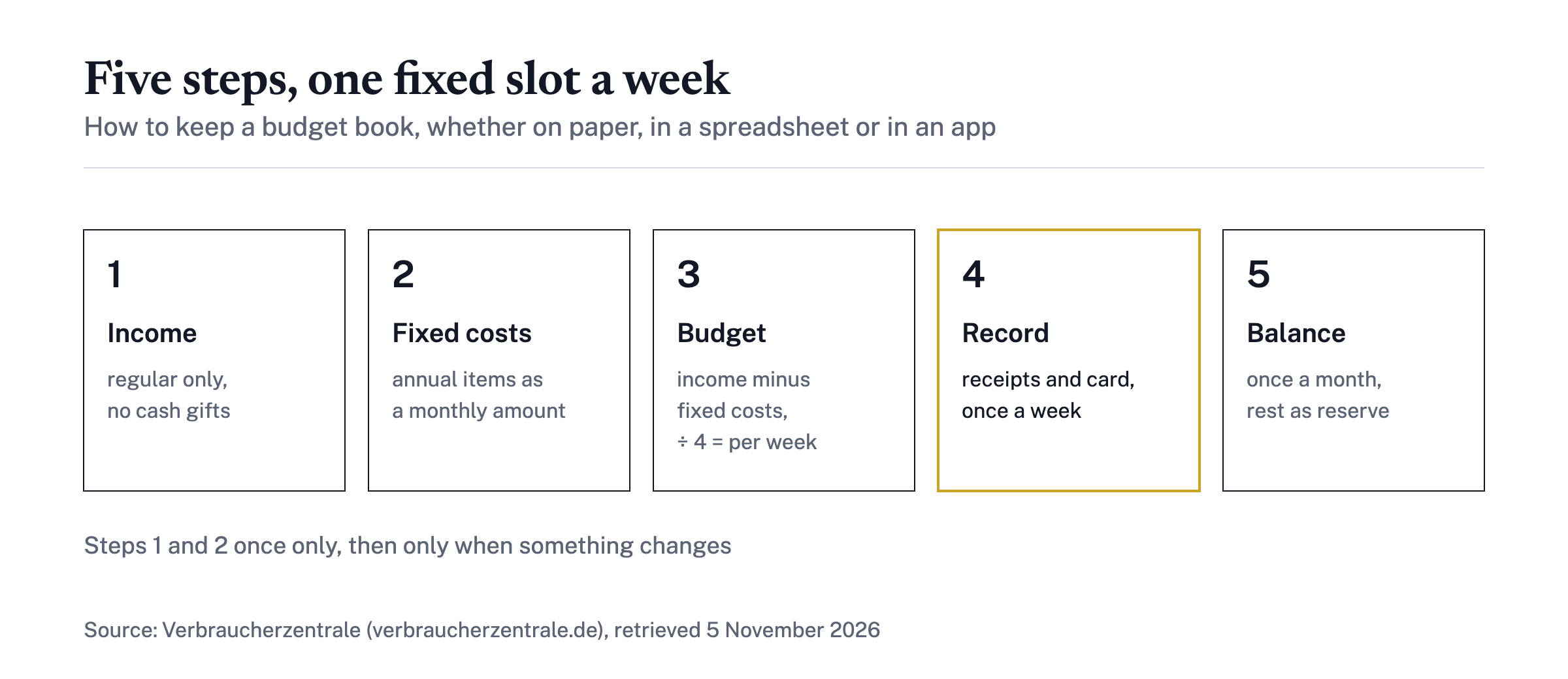
As a beginner, you keep a household budget book properly by following five steps set out by the Verbraucherzentrale, the German consumer advice centre. They apply equally to paper, spreadsheet and app.
- Write down regular income. This means income that always arrives, such as wages or child benefit. Cash gifts and a Christmas bonus do not count here.[1]
- Work out fixed costs. Rent, energy, phone and membership fees belong here. Anything due only once or twice a year, such as insurance or vehicle tax, you convert to a monthly amount and set aside as a reserve.[1]
- Calculate the budget for variable spending. Income minus fixed costs gives you the money to live on. Divided by four, it tells you how much you can spend per week without going into the red.[1]
- Record variable spending. Sort it into categories such as "food and drink" or "clothing". Receipts and notes go into a box and are entered once a week.[1]
- Draw up a balance once a month. Subtract the total of variable spending from the available budget.[1]
You do the first two steps only once and adjust the amounts when something changes. The weekly slot is the real core. With an app, too, a weekly look at whether the automatically assigned categories fit is worth the time.
Budgeting apps: what the Finanztest comparison shows
The Finanztest comparison shows that apps with an account link score better, and that cheap does not mean good. Eight widely used budgeting apps for Android and five for iOS were tested, published in Finanztest 11/23.[3] All prices below date from that test.
- Test winner: the best app cost 3.99 euros a month and received the quality rating "good".[2]
- Best app without an account link: a one-off 5.99 euros on Android and 6.99 euros on iOS, but only "satisfactory".[2]
- Price range of full versions: from a one-off purchase for 2.09 euros to an annual subscription for 39.99 euros.[3]
- Weaknesses: three apps without an account connection were "satisfactory", one only "adequate". Reasons included cluttered start screens, workflows that do not explain themselves and flaws in the privacy policy.[2]
- Security: the testers found no security flaws; all apps complied with the legal requirements.[2]
For your own choice, one criterion is especially telling. Ease of use counts for 40 percent of the overall rating, because even the best app only helps if you use it regularly.[3] Anyone who mainly wants to track spending also needs fewer features than someone who wants to bundle several accounts and securities accounts in one application.[3] The results reflect Finanztest 11/23; features and prices may have changed since, and the providers' current details are what count. Which criteria matter when choosing is explained in Budgeting apps compared: criteria for choosing one.
Is the Finanzguru app really free?
Yes, according to the provider, the basic version of Finanzguru is free for good. In it, you connect your accounts, see income and expenses and keep track of your contracts.[4] According to the provider, Finanzguru Plus costs 0.99 euros a week, while the basic version stays free (as of 5 November 2026).[4] Over a year of 52 weeks, that comes to around 51 euros.
One condition belongs to the answer: according to test.de, Finanzguru can only be used with an account connection.[3] If you do not want to show your transactions to any provider, paper, a spreadsheet or an app without an account link serve you better. Before subscribing, check which price the app actually shows at checkout, and whether you need the extra features for your budget book at all.
Create a household budget book in Excel or on paper for free
You can create a household budget book for free with a printable template or your own spreadsheet. Consumer advisory services provide material for this:
- Verbraucherzentrale: at the end of its guide, it shows sample tables for income and expenses.[1] It also offers an interactive budget planner as a calculator.[1]
- Geld und Haushalt: the advisory service sends its brochures free of charge, and postage costs nothing either.[5] Online, it offers a web budget planner for keeping spending in check.[5]
If you prefer a bound book, the Verbraucherzentrale's household budget book costs 12 euros.[1] It is not necessary.
An Excel template needs no special program. Excel, LibreOffice Calc or Google Sheets are enough; there is no single "best" Excel solution. Rebuild the Verbraucherzentrale's sample tables, with one sheet per month and these sections:
- Income: regular amounts, one row per source.
- Fixed costs: rent, energy, contracts, plus annual items converted to a monthly amount.
- Variable spending: one column per category, one row per week.
- Balance: available budget minus total variable spending.
The advantage of a spreadsheet: the totals calculate themselves, and your data stays with you. The drawback: every transaction has to go in by hand, including card payments that only leave the account later.
How can a household budget book help you save money?
A household budget book helps you save money when you use the monthly balance to change course deliberately. The Verbraucherzentrale is frank about it: keeping a household budget book does not necessarily give you more money, and on a tight income the room for manoeuvre is small. But it shows where the money disappears to and lets you steer against it better.[1]
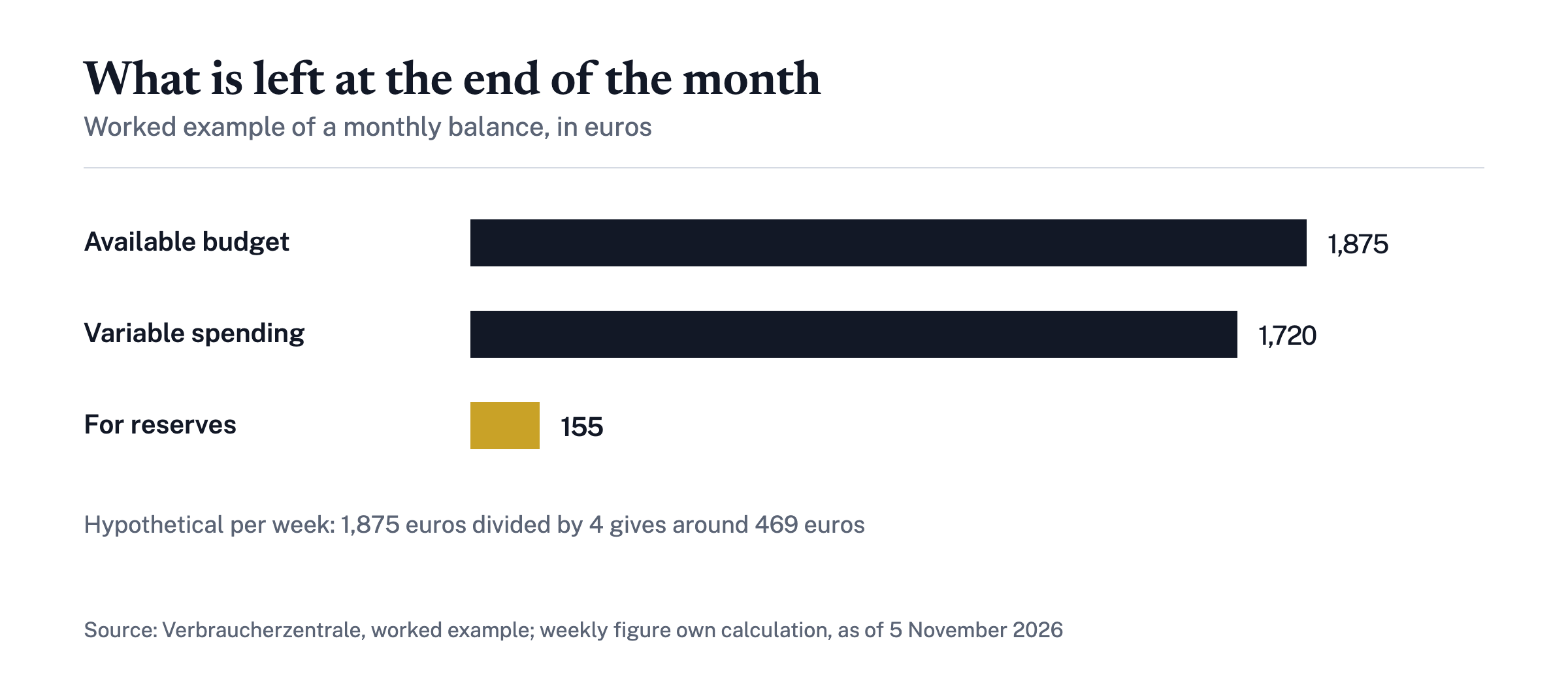
A worked example from the Verbraucherzentrale: 1,875 euros of available budget minus 1,720 euros of variable spending leaves 155 euros for reserves.[1] Taken one step further as a hypothetical, that means for the week: 1,875 euros divided by four gives a weekly budget of around 469 euros. Knowing this limit, you notice by Wednesday when a week is getting out of hand, not only at the end of the month.
If the balance is positive, you can put the surplus aside for purchases, an emergency fund or retirement savings. If it is negative, the budget book shows the category where you can act, such as frequent eating out.[1] Contracts deserve a second look: if your fixed costs alone exceed your income, first check which contracts are unnecessary or can be reduced.[1]
Where a reserve should then go so that it stays available and earns interest is explained in Instant-access savings: what matters when comparing interest rates. More guides on budgeting, fixed costs and emergency funds are collected in the Budget section.
Frequently asked questions
Is a household budget book on paper still up to date?
Yes, if you keep it regularly. Paper shows nobody your account data and works well for anyone who pays a lot in cash. The price is manual work: collecting receipts and entering them once a week.
Budgeting app or Excel: which is better?
An app with an account link saves time because it picks up and sorts card transactions automatically. An Excel spreadsheet is free, keeps your data with you and lets you choose your own categories, but every entry goes in by hand. Better is whatever you keep up for good.
Is there a free household budget template?
Yes. The Verbraucherzentrale shows sample tables for income and expenses in its guide, which you can print or copy into a spreadsheet. The advisory service Geld und Haushalt sends its brochures free of charge, postage included.
Do I have to connect my bank account to a budgeting app?
Not with every app. There are apps without an account link where you enter spending by hand. In the Finanztest comparison, apps with an account link scored better, but the testers found no security flaws in any of the apps tested.
Sources
Risk notice. The content is general information and is not investment, tax or legal advice. Investments carry risks, up to the total loss of the capital invested; past returns are not a reliable indicator of future results. Tax information reflects German law at the time of publication; have your personal situation checked by a tax adviser. Risk notice
Related reading
All Budget →Finanzguru: costs, data protection and alternatives
What does Finanzguru cost, how safe is your account data and can the German tax office see it? Free version, Plus, BaFin status and alternatives.

Budgeting apps compared: criteria for choosing one
Choosing a budgeting app: checkable criteria on cost, bank connection and data protection, Stiftung Warentest results and free alternatives.