Budgeting apps compared: criteria for choosing one
Choosing a budgeting app: checkable criteria on cost, bank connection and data protection, Stiftung Warentest results and free alternatives.
In this article10
- Criteria for choosing: what makes a good budgeting app
- Which free budgeting app is the best?
- Which free budget app is the best?
- Free budgeting apps: what free versions offer and where their limits lie
- Bank account connection or manual entry: pros and cons
- Data protection and security: what to check before installing
- Budgeting app test winners: how to interpret test results correctly
- Conclusion: three steps to the right app
- Frequently asked questions
- Sources
Criteria for choosing: what makes a good budgeting app
The question has a short answer: a good budgeting app is the one you use consistently and regularly, and that handles your data the way you can reasonably expect. Everything else, from the number of charts to AI features, is secondary. Four verifiable criteria matter: how data is recorded, the feature set, the costs and data protection.
- Recording method: automatic bank account connection, file import or manual entry. It determines how much effort the app causes in daily life and which data the provider processes.
- Core features: automatic or semi-automatic categorisation of expenses, budget limits with warnings, evaluations and savings goals.
- Costs: a free basic tier, a one-off purchase or a subscription, each with a clear boundary on what the free version offers.
- Data protection: which data is collected, where it is stored, whether it is shared with third parties, and does the app only have read access to the account?
The feature list of a recent comparison names the minimum equipment of a good app as: automatic account integration, categorisation of expenses into areas such as groceries, rent or leisure, setting and monitoring budgets with notifications when limits are exceeded, analyses and reports, and definable savings goals.[1] That is a sensible yardstick, but it does not replace your own list of priorities: if you only want to track your spending, you need fewer features than someone who wants to bundle several accounts and portfolios in one application.
One factor that is easily underestimated is usability. Stiftung Warentest gives ease of use a 40 percent weighting in the overall rating of its budgeting app tests, arguing that even the best app only helps if you use it regularly.[2] For your own choice, that means: an app with few features that you can operate in seconds every day is usually more valuable than a feature package you delete out of frustration after four weeks. If you first want a basic overview of your income and expenses, our guide to budget planning covers the fundamentals without any app-specific advice.
Which free budgeting app is the best?
There is no universally best free budgeting app, because the answer depends on your own situation: on whether you want to connect your bank accounts, how much time you are willing to invest in manual entry, and which features matter to you. As a point of orientation, the Stiftung Warentest test published in October 2023 is useful.
- 13 budgeting apps were tested, eight for Android and five for iOS, each in its current full version.[2]
- The app Finanzguru received the editorial team's best rating; apps with a bank account connection performed better overall than those without.[3]
- Finanzguru already offers a bank account connection (initially one account) and categorisation of expenses in the free basic version.[4]
- However, Finanzguru can only be used with a bank account connection; anyone unwilling to store their banking credentials cannot use the app.[2]
An honest answer includes two limitations. The test verdict referred to the paid full versions of the apps, not the free variants; the differences between free and full versions were not assessed.[2] In addition, the result dates from October 2023. Features, prices and data protection terms may have changed several times since then, and the providers' current information is what counts. The verdict is therefore a valuable point of orientation, but not an up-to-date status report on every app in the store.
Which free budget app is the best?
The terms are often used interchangeably, but they describe different focuses. A budgeting app primarily documents, retrospectively, what was spent. A budget app plans ahead: it sets a monthly budget, divides it into sub-budgets for categories and tracks savings goals. Many apps cover both, but not with equal depth. So what matters when choosing is whether your problem is documentation or planning.
| App | Cost model | Focus |
|---|---|---|
| Finanzguru | [4]Basic version free, Plus for EUR 2.99 per month | Automatic recording via bank account connection, budget planning, contract overview |
| Mein Budget (Stiftung Deutschland im Plus) | [5]free | Manual recording without bank account connection; according to the provider, data stays on the device |
| YNAB | [1]subscription only, USD 14.99 per month | Structured planning using the four-rule method, savings goals, real-time synchronisation |
Concretely, this means: Finanzguru suits you if you want to keep a general monthly budget and automate recording — and that in the free version, though only with a bank account connection. Mein Budget from the non-profit Stiftung Deutschland im Plus is free and works without a bank account connection, which means manual entry.[5] YNAB follows a structured method with four rules, but is available by subscription only and is therefore not a free option.[1] If you want to set up savings goals systematically, our guide on covers the related basics of instant-access savings accounts, fixed-term deposits and interest.
Free budgeting apps: what free versions offer and where their limits lie
Free versions are usually limited to basic functions: recording income and expenses and simple budget planning. The paid variants additionally unlock, for example, an ad-free experience, extra categories, synchronisation across multiple devices or more detailed analyses.[2] With Finanzguru, the limit is that the basic version restricts the bank account connection to one account, while the Plus version offers unlimited contract monitoring, detailed expense analyses and extended budgeting.[4]
| App or variant | Price (as of July 2026) |
|---|---|
| Price range according to Stiftung Warentest (2023) | [2]from a one-off EUR 2.09 to an annual subscription of EUR 39.99 |
| Finanzguru Plus | [4]EUR 2.99 per month |
| Outbank | [1]EUR 3.99 per month, no free version |
| YNAB | [1]USD 14.99 per month or USD 109 per year |
| MoneyControl (web version) | [1]packages for 3, 6 or 12 months at EUR 12, 18 or 28; mobile app free with in-app purchases |
A hypothetical calculation shows what a subscription means per year: at 2.99 euros per month, twelve months times 2.99 euros equals 35.88 euros, or roughly 36 euros a year. This calculation assumes the price stays constant and the subscription runs for twelve months. Whether the expense is worth it does not depend on the amount alone, but on whether the extra features measurably improve how you manage your household — for example, because you actually see which category is straining your budget. If the benefit fails to materialise, the free version is the more sensible choice.
Bank account connection or manual entry: pros and cons
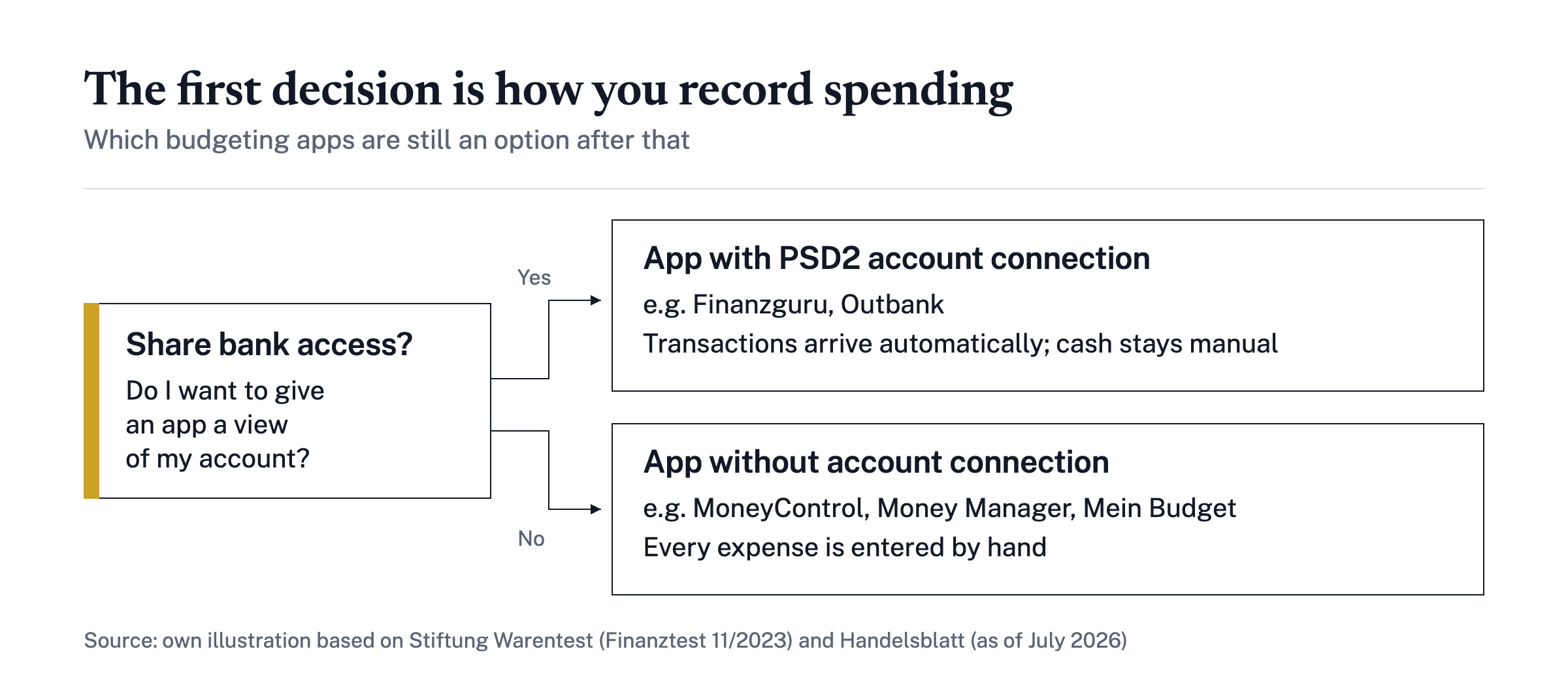
Data capture is the criterion with the greatest practical consequences, because it affects effort, completeness and data protection at the same time. Apps with a PSD2 bank account connection such as Finanzguru, Outbank or Woolsocks import transactions automatically via the secure interface of the Payment Services Directive and categorise them; Finanzguru is connected to more than 3,000 banks and savings banks in Germany.[4] Cash payments fall through the net and must be entered manually even there.
- The case for a bank account connection: little time effort, complete capture of card payments, automatic categorisation and the detection of recurring payments such as subscriptions.
- The case against a bank account connection: you give the provider insight into your account activity and extend the data flow to include connection services; the automatic categorisation needs to be checked regularly.
- Manual entry works without sharing bank access, gives you full control over amount and category, and with some apps the data is stored only on the device.
- Its drawbacks are the time effort and the risk that unrecorded expenses are missing from the evaluation.
Apps without a bank account connection such as MoneyControl, Money Manager or Mein Budget rely on manual entry.[6] The decision becomes easier if you answer two questions honestly: Will you keep up the recording over months? And do you want to entrust your bank login details to an app provider? If your answer to the second question is no, you choose an offline app and accept the entry effort. If, on the other hand, you value completeness without daily effort and are comfortable with the data flow, a PSD2 app serves you better. You can find background information on accounts and fees in our section on banking.
Data protection and security: what to check before installing
In its test of budgeting apps, Stiftung Warentest examines three data-protection-related points: whether the apps have security flaws, whether they respect data protection, and whether they send data to third parties.[2] These three questions are also a good basis for your own assessment, regardless of which app you are considering.
Some concrete pointers: apps with a bank connection use the PSD2 interface, which imposes high security requirements and is used by Finanzguru or Outbank.[1] On storage, the providers make their own statements; in Finanzguru's case, processing is encrypted according to PSD2 standards.[4] Important context: such statements are self-declarations by the provider, not independently verified claims. That is precisely why it is worth looking at the test criteria of an independent institution.
- Read the privacy policy to find out which data is collected for which purpose and how long it is stored.
- Check whether the data is processed in Germany or the EU and whether it goes to third parties or advertising partners.
- Clarify whether the app only has read access to the account or may also initiate transfers.
- Check the app's permissions in the operating system and watch out for unnecessary access.
- Treat the provider's statements as self-declarations and compare them with independent test verdicts.
Budgeting app test winners: how to interpret test results correctly
Test verdicts are helpful, but only if you know their methodology. The Stiftung Warentest budgeting app test of October 2023 examined the full versions of 13 apps, not the free variants. Ease of use carried a 40 percent weight in the overall rating, and two apps received the Finanztest quality verdict of Good.[2] A test winner from that test is therefore, first of all, a verdict on the full version as it was under the conditions at that time.
Three limitations apply here. The result dates from October 2023; apps are updated continuously, and prices and data protection terms change. Many current comparison sites online are commercial and carry affiliate links, which limits their independence. And a verdict on the full version says nothing about whether the free variant is sufficient for your purpose, because the differences between the free version and the full version were not rated in the test.[2]
- When was the test conducted? A date older than about a year is a warning sign of outdated terms.
- Which version was tested, the free variant or the paid full version?
- Which criteria were included with what weighting, and do they match your priorities?
- Does the verdict also apply to the free variant, the one you would actually use?
- Who carried out the test, an independent institution or a provider with affiliate links?
Conclusion: three steps to the right app
The choice can be reduced to three steps. First, decide on a recording method, that is bank account connection or manual entry, and rule out all apps in the other category. Then test the free version for two to three months with real data, not just based on the product page. Only decide on a premium version once the extra features demonstrably improve how you manage your household, for example because you can see concrete savings potential.
No app replaces the assessment itself. A method in five steps has proven effective: record your regular income, identify all fixed expenses, calculate the available budget for variable expenses, document those expenses, and take stock once a month. An app can accompany these steps, but not shorten them.
A recent development underlines this: the inflation rate stood at 3.3 percent in September 2026, and energy products became 14.9 percent more expensive than in the same month of the previous year.[7] Precisely then it is worth looking at which categories weigh on your budget, and that is exactly what a consistently kept budgeting app shows. Limits remain: the terms and data protection conditions of the apps change, and this article is general information, not personal advice. If fixed expenses exceed your income, free debt help offers can help. Further guidance on money, investing and retirement provision can be found in the finance guide from Livossa.
Frequently asked questions
Which free budgeting app is the best?
There is no one-size-fits-all answer. In the Stiftung Warentest test from October 2023 covering 13 budgeting apps, Finanzguru was the test winner; the app already offers bank account connection and automatic categorisation in the free version, but only works with a connected bank account. Those who prefer not to share their account details will find a free, ad-free alternative in offline apps such as Mein Budget. More important than the test winner is which app suits your own recording method and is used regularly.
How much does a budgeting app cost?
The basic versions of widely used apps are free. For full versions, Stiftung Warentest found price ranges in its test from a one-off 2.09 euros to an annual subscription at 39.99 euros. Finanzguru Plus costs 2.99 euros per month, Outbank 3.99 euros per month, YNAB 14.99 US dollars per month (as of July 2026). Before buying, it is worth checking whether extra features such as synchronisation or multiple budget categories measurably increase the benefit for you.
Are there budgeting apps without a bank account connection?
Yes. MoneyControl, Money Manager and Mein Budget work without a bank connection: income and expenses are recorded manually. According to the providers, Money Manager and Mein Budget store the data exclusively offline on the device and do not send it to servers. The drawback is the extra time required for manual entry, even though many apps offer templates or repeat functions for recurring transactions such as rent.
Is the bank account connection in budgeting apps secure?
Apps with a bank connection such as Finanzguru or Outbank use the banks' PSD2 interfaces, which require encrypted connections, and usually receive only read access to the accounts. As test criteria, Stiftung Warentest checked whether the apps have security flaws, respect data protection and send data to third parties. If you are unsure, read the privacy policy before installing and check where the data is stored; provider statements on this are self-declarations.
What is the difference between a budgeting app and a budget planner app?
A budgeting app first records all income and expenses retrospectively, often automatically via the bank account connection. A budget planner app focuses on forward-looking planning: it sets monthly or partial budgets, warns when limits are exceeded and tracks savings goals. Many widely used apps combine both, for example Finanzguru with budget limits in the free version or Mein Budget with savings goals. If you mainly want to know where your money goes, a simple bookkeeping app is enough.
Is a budgeting app worthwhile given rising prices?
A budgeting app does not create additional income, but it makes visible which expenses strain your budget. This is particularly useful when prices are rising: according to the Federal Statistical Office, the inflation rate in Germany was 3.3 percent year-on-year in September 2026, with energy products becoming 14.9 percent more expensive. If you know which categories show the strongest price increases, you can respond more specifically and set aside amounts for reserves.
How can I recognise a reputable app comparison on the internet?
Serious comparisons state the date of the data, the versions tested and their criteria. Stiftung Warentest discloses that it tested full versions and that ease of use accounted for 40 percent of the overall rating. Many comparison sites on the web, by contrast, are commercial: they earn money from affiliate links and preferentially recommend advertised apps. Check, therefore, whether a test date is given, whether the free version was rated and whether the criteria are described in a comprehensible way.
Sources
Risk notice. The content is general information and is not investment, tax or legal advice. Investments carry risks, up to the total loss of the capital invested; past returns are not a reliable indicator of future results. Tax information reflects German law at the time of publication; have your personal situation checked by a tax adviser. Risk notice